

Overview
Fontana installs on native Kubernetes. You provision a cluster once with whatever your environment already offers, then one command, fontana apply, installs everything else from a file you control. The same command, the same charts, and the same release artifacts run on an Ubuntu server, on Amazon EKS, and on a macOS laptop.
There are two layers, and the line between them never moves:
| Layer | Who owns it | What it produces |
|---|---|---|
| Provision | You, once per environment | A Kubernetes cluster and a kubeconfig. Nothing Fontana-shaped is running yet. |
fontana apply |
The Fontana CLI, every deploy | Ingress, certificates, the shared services you declared, and one namespace per workspace, installed with Helm. |
The deploy model
Section titled “The deploy model”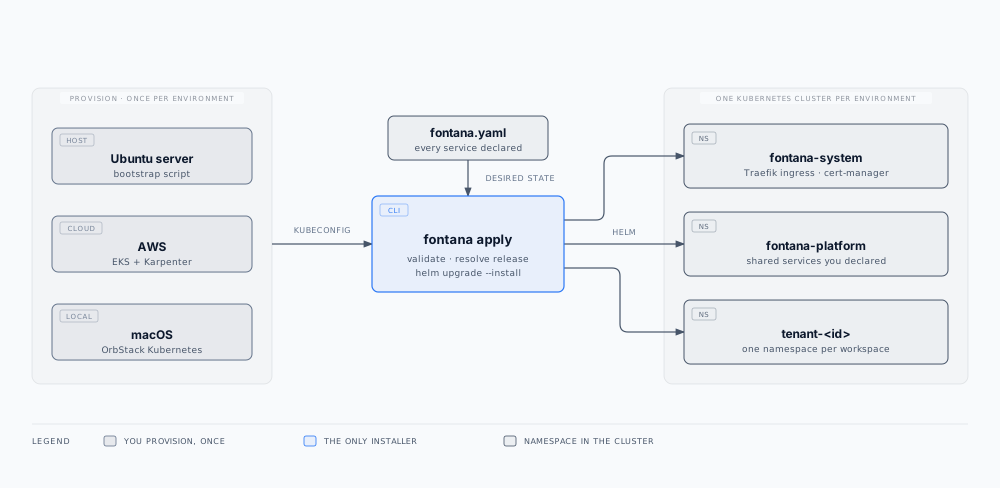
fontana apply needs two things: a kubeconfig and a fontana.yaml. It validates the file, resolves the release, and runs helm upgrade --install for each chart and namespace. It never creates a cluster, never installs a host proxy or a host scheduler, and needs no shell on any machine other than the one you run it from. The CLI ships its own pinned Helm and tooling, so it does not depend on whatever your host already has installed.
Where Fontana runs
Section titled “Where Fontana runs”| Environment | You provision with | Then |
|---|---|---|
| Ubuntu server (your datacenter, a rented box, a cloud VM) | The published bootstrap script: k3s, a host firewall, unattended security upgrades, and API audit logging | fontana apply |
| AWS | Amazon EKS, with the ingress behind a network load balancer | fontana apply, from your deploy pipeline on approval |
| macOS (evaluation, development) | Enable Kubernetes in OrbStack | fontana apply |
| Your existing Kubernetes | Nothing new | fontana apply against that kubeconfig |
A fresh Ubuntu server goes from a bare operating system to a workspace answering over HTTPS with production certificates in under ten minutes, with no build tools on the box. See Self-hosted deployment for the Linux and laptop paths, and Cloud deployment for managed cloud and customer VPC.
Nothing installs by omission
Section titled “Nothing installs by omission”fontana.yaml declares every service, for every scope. Each one is exactly one of three things:
| Declaration | Meaning |
|---|---|
disabled: false |
Install it in this cluster |
url: https://… |
Do not install it; consume that origin instead |
disabled: true |
Do not install it and do not consume it |
Leaving a service out is not a shortcut to a default. fontana apply stops and lists everything undeclared, so a deployment can never drift into a shape nobody wrote down. The file is a complete, reviewable statement of what runs where, which is exactly what a change-control process needs.
Certificates and ingress
Section titled “Certificates and ingress”fontana apply installs Traefik and cert-manager into fontana-system on every cluster, so routing and security headers are identical everywhere. Certificates come from one of two issuers you choose in fontana.yaml:
- Let’s Encrypt (
tls.issuer: acme) for public domains. Validation runs over HTTP through Traefik, so no DNS provider credentials are needed, and renewal is automatic. - A local certificate authority (
tls.issuer: local-ca) for local-only domains such as*.teston a laptop. The CLI exports the CA and trusts it for you.
You point DNS for the apex and the wildcard at the cluster ingress. There is no separate proxy to configure on the machine and no certificate file to copy.
Releases and upgrades
Section titled “Releases and upgrades”Releases are immutable. Every release is a versioned bundle of content-addressed images and charts, verified by checksum when the CLI installs it. Installed releases sit side by side under the CLI’s home directory, and a current link names the one in use.
To upgrade, change source.tag and run fontana apply again. The CLI installs the new release beside the old one, re-executes on it so the run and the artifact never disagree, and rolls only the workloads whose images or configuration changed. Kubernetes starts a replacement, waits for it to pass a readiness check, and only then retires the previous pod. Stateless services measured zero failed requests during rolling upgrades; stateful components may restart briefly when their own images change. There is no maintenance page and no deploy-time stop. Rolling back is pointing back at a previous release. See Fontana CLI for the command surface and Backup and restore for data recovery.
Security posture
Section titled “Security posture”- Default-deny network policy in every namespace, with each permitted route declared, including the Kubernetes API endpoint, whose port differs per platform and is detected at apply time
- Secrets in HashiCorp Vault inside the cluster; workloads authenticate with their Kubernetes service-account identity, and no secret is written into
fontana.yaml - Zitadel SSO with MFA enforced on every install that is not on a local-only domain
- TLS everywhere, from Let’s Encrypt or the local CA
- Kubernetes API audit logging and unattended security upgrades on Ubuntu installs
- Content-addressed, pinned images, and operator RBAC reconciled on every apply
fontana soc2 snapshotwrites an evidence pack from the live cluster
Topics
Section titled “Topics”- Architecture: namespaces, shared services, and workspace isolation
- Hardware requirements: cluster RAM, CPU, and disk from Helm requests and limits
- Cloud deployment: Fontana-managed cloud and customer VPC on AWS
- Self-hosted deployment: Ubuntu servers, laptops, private registry mirrors, and customer-operated clusters
- Backup and restore: nightly online backups, release rollback, and Admin configuration export
- Fontana CLI: install,
fontana.yamlkeys, apply, and status
Related documentation
Section titled “Related documentation”- Security: isolation, encryption, supply chain, SOC 2 control summary
- Compliance evidence: workflow lineage and immutable audit trail
- Observability: Grafana and health probes after install
- Identity and access: Zitadel provisioned per workspace
- Platform overview: runtime components and platform capabilities