

Self-hosted deployment
Self-hosted deployment means you own the machine, the network, and the change control: an on-premises datacenter, a private cloud, a rented Linux server, or a laptop used for evaluation. You run the same charts, the same pinned releases, and the same fontana apply as every other deployment model.
When to choose self-hosted
Section titled “When to choose self-hosted”- Data residency or air-gap requirements that keep the cluster inside your facility
- Existing Kubernetes operations: you already run clusters and want Fontana as a standard Kubernetes workload
- Private registry policy: mirror Fontana images internally rather than pulling from the public registry at runtime
- Customer-operated change control: your change board, backup, and DR procedures own the lifecycle
- Evaluation on a laptop before committing to an environment
First install, end to end
Section titled “First install, end to end”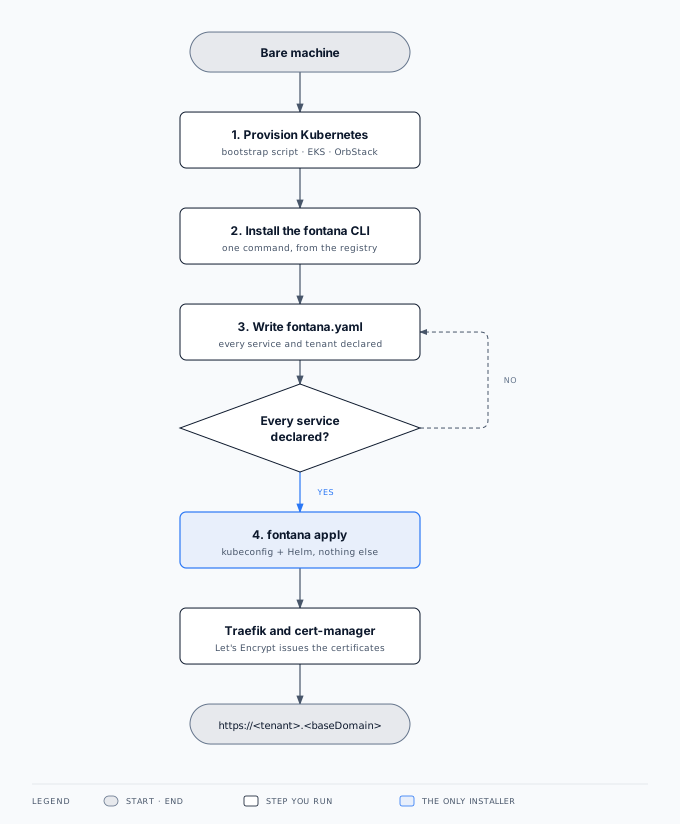
Ubuntu server
Section titled “Ubuntu server”A fresh Ubuntu 24.04 server reaches a workspace answering over HTTPS with Let’s Encrypt certificates in about nine minutes, with no build tools on the box. You need root on the machine, a registry read token from Fontana, and DNS for your base domain.
1. Provision Kubernetes
Section titled “1. Provision Kubernetes”The published bootstrap script turns a bare machine into a cluster the CLI can target. It is idempotent, so re-running it is a no-op, and it installs only infrastructure:
curl -fsSL https://<install-host>/cli/bootstrap-ubuntu.sh \ | sudo -E bash -s -- --base-domain acme.example.com| It sets up | Why |
|---|---|
| k3s with the API server’s audit log enabled and retained | A Kubernetes cluster, and an audit trail your reviewers can read |
| A host firewall: SSH, HTTP, and HTTPS open; the Kubernetes API closed to the internet | The cluster API is reachable over SSH, not from the public internet |
| Unattended security upgrades and time synchronisation | OS patching and trustworthy audit timestamps |
| Helm and the YAML tooling the installer expects | The CLI brings its own pinned copies as well |
The script never installs Fontana itself. Disk encryption, restricting SSH to your operator ranges or a bastion, and the provenance of the OS image remain your responsibility.
2. Install the CLI
Section titled “2. Install the CLI”export FONTANA_GHCR_PAT=… # registry read token from Fontanacurl -fsSL https://<install-host>/cli/install.sh | sudo -E bashThe installer pulls the versioned deploy bundle, verifies its checksums, links the version-matched fontana command into your PATH, and seeds a starter fontana.yaml in the working directory. See Fontana CLI for where it keeps its state.
3. Write fontana.yaml
Section titled “3. Write fontana.yaml”Edit the seeded file: base domain, release tag, certificate issuer contact, every platform service, and every workspace. Nothing installs by omission: a service you leave out is an error, not a default. The starter file already has the right shape; you fill in the values. The full key reference is in Fontana CLI.
4. fontana apply
Section titled “4. fontana apply”export FONTANA_GHCR_PAT=… # same token, same shellfontana applyThe CLI validates the file, installs Traefik and cert-manager, installs the services you declared, and deploys each workspace into its own namespace. When it returns, Let’s Encrypt has issued certificates for your base domain and every workspace hostname, and your workspace answers at https://<tenant>.<baseDomain> with SSO at https://auth-<tenant>.<baseDomain>. fontana status repeats the health checks at any time.
Upgrading
Section titled “Upgrading”Set source.tag to the new release and run fontana apply again. Only the workloads that changed roll, and stateless services measured zero failed requests during the rollout. See Fontana CLI.
macOS laptop
Section titled “macOS laptop”A laptop install uses OrbStack with its built-in Kubernetes. It is the same fontana apply and the same charts, sized down by consuming the heavy shared services from a URL or turning them off.
1. Provision Kubernetes
Section titled “1. Provision Kubernetes”Install OrbStack and enable Kubernetes. That places an orbstack context in your kubeconfig, which is all the CLI needs.
orb config set k8s.enable true2. Install the CLI
Section titled “2. Install the CLI”Run the installer as your user, never with sudo. It installs into your Homebrew prefix and keeps its state under your home directory.
export FONTANA_GHCR_PAT=… # registry read token from Fontanacurl -fsSL https://<install-host>/cli/install.sh | bash3. Write fontana.yaml
Section titled “3. Write fontana.yaml”Use a local-only base domain such as fontana.test, the local certificate issuer, and the orbstack context. Because OrbStack publishes the ingress ports on the Mac’s loopback address, declare hostsAddress: 127.0.0.1 so the CLI can map your hostnames for you:
baseDomain: fontana.test
tls:  issuer: local-ca
clusters:  local:    kubeconfig: "{HOME}/.kube/config"    context: orbstack    hostsAddress: 127.0.0.1
tenants:  demo:    cluster: local    marquez: { disabled: true }    zitadel: { mfa: false } # accepted only on local-only base domains
4. fontana apply
Section titled “4. fontana apply”fontana applyTwo things need your permission, once each per machine: the CLI writes a managed block in /etc/hosts mapping the workspace hostnames to loopback (an admin password prompt), and it trusts the cluster’s certificate authority in your login keychain (a keychain prompt). After that, the workspace is at https://demo.fontana.test and SSO at https://auth-demo.fontana.test, with certificates your browser accepts.
MFA may be switched off only on local-only domains (localhost, *.localhost, *.test). The CLI refuses to disable it anywhere else.
What you operate
Section titled “What you operate”| Area | Your responsibility |
|---|---|
| Hardware or VM | Sizing, OS patching policy, disk encryption on the underlying volumes |
| Network | Public HTTPS, SSH for operator access, firewall rules, corporate DNS |
| Kubernetes | The cluster itself: nodes, upgrades, storage class, and capacity |
| Backups | An S3-compatible bucket for the nightly backups, its access policy, and your restore drills |
| Upgrades | Pin source.tag, run fontana apply in approved windows, validate with fontana status |
What Fontana supplies
Section titled “What Fontana supplies”- Pinned, content-addressed images and charts for every release, from the registry or your mirror
- The Fontana CLI, which reconciles the whole cluster from
fontana.yamland carries its own pinned toolchain - The same architecture as cloud: system, platform, and per-workspace namespaces
- Online backups as a nightly job per workspace, with retention you declare
- Documentation for observability, identity, compliance, and upgrade semantics
Air-gapped and restricted networks
Section titled “Air-gapped and restricted networks”Where outbound access is limited, two things need a decision up front:
- Images: mirror the release into a registry your cluster can reach, and pin
source.tagto the release you mirrored. - Certificates: Let’s Encrypt validation needs the ingress to be reachable on HTTP from the internet. Where it is not, use the local certificate issuer and distribute its CA through your device management, or have your platform team supply certificates through your existing certificate process.
Build-on-the-box installs
Section titled “Build-on-the-box installs”A machine that also builds Fontana from source can serve its own images from a registry on that machine, which is useful for integration environments that deploy many times a day. The bootstrap script sets this up on request. Production installs should pin a published release instead, so the artifact trail stays auditable.
Related documentation
Section titled “Related documentation”- Hardware requirements: RAM, CPU, and disk, including the laptop profile
- Architecture: namespaces and isolation
- Fontana CLI: install,
fontana.yamlkeys, apply, status - Backup and restore: nightly online backups and configuration export
- Cloud deployment: managed cloud and customer VPC alternatives
- Security: encryption at rest, isolation, supply chain
- Compliance evidence: lineage and immutable audit trail