
Architecture
Fontana runs as three kinds of namespace inside one Kubernetes cluster per environment: a system namespace for ingress and certificates, a platform namespace for the shared services you chose to install, and one namespace per workspace holding the full application stack. The layout is identical on Amazon EKS, on a k3s server, and on OrbStack on a laptop, because the same fontana apply and the same charts produce it everywhere.
Topology
Section titled “Topology”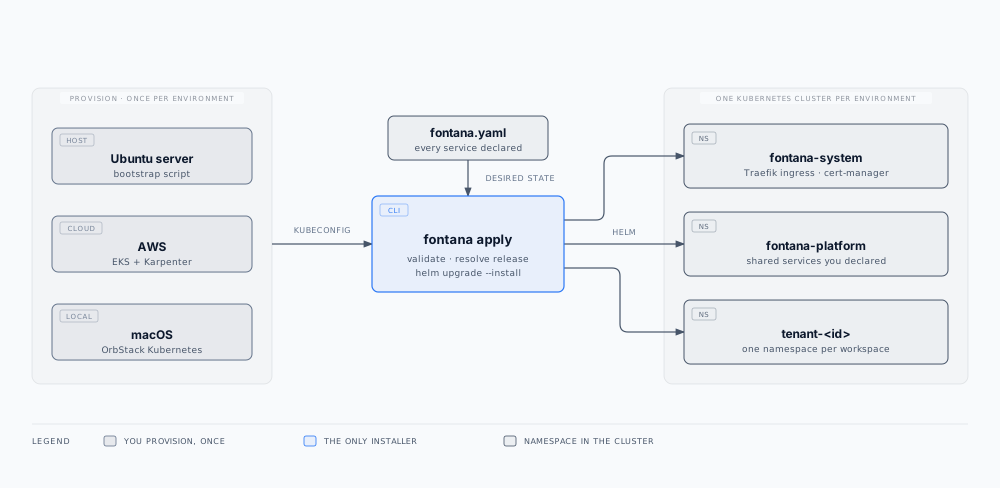
| Namespace | Installed by | Contents |
|---|---|---|
fontana-system |
fontana apply, once per cluster |
Traefik ingress, cert-manager and its certificate issuer (Let’s Encrypt or the local CA), the welcome page on the base domain, cluster-scoped roles and custom resources |
fontana-platform |
fontana apply, when at least one service is declared installed |
Shared services you declared: document parsing, embeddings, text to speech, sandboxed code execution, browser automation, observability, the platform status page |
tenant-<id> |
fontana apply, one per workspace |
The complete Fontana environment for that workspace |
Whatever provisions the cluster, whether a bootstrap script, Terraform, or OrbStack, stops at the kubeconfig. It does not install Fontana charts. That keeps one deployer, one code path, and one place to look when a deploy behaves differently in two environments.
Workspace namespace
Section titled “Workspace namespace”Each workspace is a complete Fontana environment, not a slice of a shared one:
| Area | Components |
|---|---|
| Application | Flow, served from inside the cluster, the backend, the workflow engine, the connector runtime |
| Data | Postgres, backend persistence, the workspace graph database, the encrypted workflow file store |
| Security | HashiCorp Vault for BYOK and connector secrets, Zitadel identity |
| Observability | Telemetry forwarding and security audit ingress |
| Health | Probes for the app, engines, backend, graph store, Vault, and their dependencies |
| Backups | A nightly job that exports every stateful component to your bucket while the workspace keeps serving |
There is no shared database and no shared secret store between workspaces. SSO, RBAC, AI configuration, and run data stay inside the workspace boundary unless you configure egress.
Isolation between workspaces
Section titled “Isolation between workspaces”| Control | How it is enforced |
|---|---|
| Network | Default-deny NetworkPolicy per workspace namespace; every permitted route is declared, including the Kubernetes API endpoint, whose port differs per platform and is detected at apply time |
| Secrets | A separate Vault per workspace. Workloads authenticate to it with their Kubernetes service-account identity; there are no shared credentials to rotate |
| Identity | A self-hosted Zitadel per workspace: SSO, MFA, and RBAC scoped to that workspace |
| Data | Separate databases, graph store, and persistent volumes |
| Resources | ResourceQuota and LimitRange per workspace, so one workspace cannot starve another |
| Runtime | Pod Security Standards applied to every workspace namespace |
| Operator access | A committed operator role matrix, reconciled in every namespace on every apply |
| Scheduling | An optional dedicated node pool per workspace, using a taint and a matching toleration |
Shared platform services
Section titled “Shared platform services”Platform services are shared deliberately, because running a document parser or an embedding server per workspace costs far more memory than it earns. Each one is declared per environment, and each declaration is explicit:
- Install it in
fontana-platformwhen you want it close to your workloads - Point at a URL when a platform plane elsewhere already runs it, in which case nothing is installed locally and calls go to that bearer-guarded origin
- Turn it off when you do not use the feature at all
The platform namespace holds no workspace databases, Vault secrets, or workflow datasets. See Workspace isolation for the compensating controls on each shared service.
Ingress and certificates
Section titled “Ingress and certificates”Traefik terminates TLS for the base domain, every workspace hostname under it, and the platform hostnames. cert-manager requests and renews certificates automatically, so certificate lifecycle is part of the cluster rather than a task on someone’s calendar. Security headers, rate limiting, and route ordering are configured on the ingress by the charts, which means the same protections apply in every environment.
| Platform | How the ingress is reached | Certificates |
|---|---|---|
| Ubuntu server (k3s) | Traefik binds the host’s HTTP and HTTPS ports | Let’s Encrypt, validated over HTTP through Traefik |
| AWS (EKS) | Traefik behind a network load balancer | Let’s Encrypt |
| macOS (OrbStack) | Traefik’s ports are published on the Mac’s loopback; the CLI maps your hostnames to it | A CA generated in the cluster, trusted in your keychain by the CLI |
Routing configuration is identical in all three cases.
What this means for you
Section titled “What this means for you”- Blast radius: a compromise or misconfiguration in one workspace does not grant access to another workspace’s data plane.
- Reproducibility: the cluster’s entire Fontana state comes from
fontana.yamlplus a pinned release, so two environments differ only where you wrote them differently. - Compliance narrative: isolation, encryption at rest, and audit routing map cleanly onto namespaces you can inspect during diligence, and
fontana soc2 snapshotcaptures them as evidence. See Security and Compliance evidence.
Related documentation
Section titled “Related documentation”- Deployment overview: the two layers and where Fontana runs
- Hardware requirements: requests and limits per namespace
- Cloud deployment: managed cloud and customer VPC
- Self-hosted deployment: Ubuntu servers, laptops, and private registry
- Backup and restore: the nightly backup job and recovery paths
- Fontana CLI:
fontana.yamlkeys and the apply pipeline - Platform overview: product capabilities and technology stack