

Fontana CLI
The fontana CLI is the single operator entry point for a Fontana installation. You declare desired state in fontana.yaml and reconcile the cluster with fontana apply. The CLI talks to the Kubernetes API through a kubeconfig you already have and installs Helm releases. It does not manage the machine, the container runtime, or a host proxy, and it never creates a cluster.
Before you install
Section titled “Before you install”Provision Kubernetes first. The CLI expects a kubeconfig:
| Environment | Provision with |
|---|---|
| Ubuntu server | The published bootstrap script: k3s, a host firewall, unattended security upgrades, API audit logging |
| AWS | Amazon EKS, with the ingress behind a network load balancer |
| macOS | Enable Kubernetes in OrbStack |
| Existing cluster | Nothing: point clusters.<name>.kubeconfig at it |
See Self-hosted deployment for the provisioning step in full.
Install
Section titled “Install”export FONTANA_GHCR_PAT=… # registry read token from Fontanacurl -fsSL https://<install-host>/cli/install.sh | sudo -E bash # Linuxcurl -fsSL https://<install-host>/cli/install.sh | bash # macOS, as your userThe installer pulls the versioned deploy bundle, verifies its checksums, links the version-matched fontana command into your PATH, and seeds a starter fontana.yaml in the working directory if one is not already there.
Where the CLI keeps things
Section titled “Where the CLI keeps things”Everything the CLI owns lives under one FONTANA_HOME directory: /opt/fontana on Linux, ~/.fontana on macOS.
| Path | Contents |
|---|---|
releases/<version> |
One directory per installed release: charts, scripts, and the image manifest. Immutable once installed. |
current |
A link to the release in use. |
bin |
The CLI’s own pinned toolchain: Helm 3, a YAML processor, and the registry client. The CLI never uses the host’s Helm. |
kubeconfigs, exported CA certificates |
Working files the CLI derives from fontana.yaml. |
Releases are named by content: a sha-… tag identifies one immutable build. Installing a newer tag places it beside the old one and moves current; nothing is overwritten.
Configuration
Section titled “Configuration”fontana.yaml is the only declarative config the CLI reads. It lives in the working directory; override its path with --config <path> or FONTANA_CONFIG.
The file names the Kubernetes clusters the CLI may deploy to, and nothing installs by omission. Every platform service must be declared, and every workspace must state its own switches. If anything is missing, fontana apply fails and lists all missing keys at once, so you fix a new file in one pass rather than one error at a time.
Top-level keys
Section titled “Top-level keys”| Key | Purpose |
|---|---|
version |
Config schema version. |
baseDomain |
The domain Fontana serves. Workspaces answer at <name>.<baseDomain>, SSO at auth-<name>.<baseDomain>, and the welcome page at the apex. Point the apex and the *.<baseDomain> wildcard at the cluster ingress. |
environment |
A label stamped on telemetry so dashboards can separate installs. |
platformBearer |
The shared bearer used when platform services are consumed or installed. Never a literal token: write the brace placeholder naming the environment variable that carries it, and the CLI expands it at apply time. |
source.kind |
ghcr to pull a published release, or folder to deploy a build produced on the machine. |
source.registry |
Registry namespace for ghcr. Point this at your private mirror when you maintain one. |
source.tag |
Release tag. Pin an immutable sha-… tag in production. |
source.path |
Build folder for folder. |
tls.issuer |
acme for Let’s Encrypt on public domains, or local-ca for a certificate authority generated in the cluster (local-only domains such as *.test). |
acme.email |
Contact address for the Let’s Encrypt issuer. Required with tls.issuer: acme. |
acme.staging |
Optional. Uses the Let’s Encrypt staging directory, which issues untrusted certificates without rate limits. For disposable environments you rebuild often, never for production. |
snapshots |
Backup retention and schedule. See Backups. |
remoteStore |
The S3-compatible bucket that receives the nightly backups. See Backups. |
wormAudit.s3 |
Optional Object Lock bucket for compliance audit evidence. See Security audit and WORM. |
Clusters
Section titled “Clusters”| Key | Purpose |
|---|---|
clusters.<name>.kubeconfig |
Required per cluster. Path to the kubeconfig the CLI uses. A {HOME} placeholder expands to your home directory. |
clusters.<name>.context |
Optional named context inside that kubeconfig, for example orbstack. |
clusters.<name>.serviceType |
How the ingress is exposed: LoadBalancer (default, used by k3s, EKS, and OrbStack) or ClusterIP when service addresses are routable without a host port. |
clusters.<name>.hostsAddress |
Local-only domains: the address the CLI writes into /etc/hosts for every hostname it serves. 127.0.0.1 on OrbStack, which publishes the ingress ports on loopback. |
clusters.<name>.serviceAnnotations |
Optional map of annotations for the ingress Service, for clouds that shape the load balancer from annotations. On Amazon EKS with the AWS Load Balancer Controller, set service.beta.kubernetes.io/aws-load-balancer-scheme: internet-facing — without it the controller provisions an internal load balancer. |
Platform services
Section titled “Platform services”Declare every key under platform as exactly one of three things:
| Declaration | Effect |
|---|---|
url: https://… |
Consume that bearer-guarded origin. Nothing is installed for this service. |
disabled: false |
Install it in the fontana-platform namespace. |
disabled: true |
Do not install it and do not consume it. The dependent feature fails clearly at the point of use. |
| Service key | What it provides |
|---|---|
docling |
Document parsing for PDF and office uploads |
infinity |
Embedding server. Never enable both infinity and tei |
tei |
Alternative embedding server |
tts |
Kokoro text to speech |
opensandbox |
Sandboxed code execution for agent tooling. The MCP endpoint is {url}/mcp |
steel |
Managed browser sessions for agent browsing |
observability |
Telemetry. Set url for a shared collection endpoint plus uiUrl for the Grafana operators sign in to, or disabled: false to run collection and dashboards in this cluster |
ner |
Optional entity-extraction model server |
gatus |
Platform status page at status.platform.<baseDomain>, guarded by an operator login |
platform.cluster selects which named cluster hosts the services you install. It defaults to the cluster of your first workspace.
Workspaces
Section titled “Workspaces”Each entry under tenants is one workspace. cluster is required, and the optional switches must be stated explicitly:
| Key | Purpose |
|---|---|
tenants.<id>.cluster |
Which named cluster this workspace is deployed into. Give a workspace its own cluster by naming a different one here. |
tenants.<id>.marquez.disabled |
Required boolean. false installs the data-lineage catalog at lineage-<id>.<baseDomain>. |
tenants.<id>.zitadel.mfa |
Required boolean. true enforces MFA. false is accepted only on a local-only base domain (localhost, *.localhost, *.test); the CLI refuses it anywhere else. |
tenants.<id>.settings |
Optional non-secret KEY: value pairs passed to the workspace as configuration. |
tenants.<id>.quota |
Optional ceiling on the workspace’s total CPU and memory limits, as Kubernetes quantities (cpu: "8", memory: 32Gi). Containers that declare no resources receive bounded defaults from the workspace, so a quota never blocks a pod. |
Backups
Section titled “Backups”With a remoteStore declared, every workspace gets a nightly backup job that runs while the workspace keeps serving. Without one, no job is created.
| Key | Purpose |
|---|---|
remoteStore.kind |
s3. Any S3-compatible object store works. |
remoteStore.endpoint, region, bucket |
Where the backups go. |
remoteStore.backupPrefix |
Optional key prefix inside the bucket; each workspace gets its own folder under it. |
snapshots.schedule.daily |
HH:MM in UTC. Default 02:00. |
snapshots.retain.daily |
Number of nightly runs to keep. At least 1 when a remoteStore is set. |
snapshots.retain.monthly |
Number of months whose first run is kept. |
The bucket credentials are environment variables at apply time, never values in the file. See Backup and restore.
Secrets
Section titled “Secrets”Secrets are never literal values in fontana.yaml. Export them in the shell that runs fontana apply:
FONTANA_GHCR_PAT(and optionallyFONTANA_GHCR_USER) so the CLI can pull the release bundle and images. The CLI turns this into a pull secret in every namespace that runs Fontana images.- The platform bearer token, when any platform service is consumed by URL or installed. Your platform team mints it;
fontana secretsdoes not print it. FONTANA_REMOTE_S3_ACCESS_KEYandFONTANA_REMOTE_S3_SECRET_KEYwhen aremoteStoreis declared. Apply fails rather than deploying a backup job that cannot upload.
Example
Section titled “Example”version: 1baseDomain: acme.example.comenvironment: acme-prod
platformBearer: "{…}" # brace placeholder naming the env var that carries the token
source: kind: ghcr registry: <your-registry-namespace> tag: sha-abc123def456 # pin an immutable tag in production
tls: issuer: acmeacme: email: ops@acme.example.com
clusters: main: kubeconfig: /etc/rancher/k3s/k3s.yaml
remoteStore: kind: s3 endpoint: https://s3.example.com region: eu-central-1 bucket: acme-fontana-backupssnapshots: schedule: { daily: "02:00" } retain: { daily: 7, monthly: 12 }
platform: cluster: main docling: { url: https://docling.platform.example.com } infinity: { url: https://infinity.platform.example.com } tei: { disabled: true } tts: { url: https://kokoro.platform.example.com } opensandbox: { url: https://opensandbox.platform.example.com } steel: { url: https://steel.platform.example.com } ner: { disabled: true } gatus: { disabled: false } observability: url: https://otlp.platform.example.com uiUrl: https://observe.platform.example.com
tenants: demo: cluster: main marquez: { disabled: false } zitadel: { mfa: true } quota: { cpu: "8", memory: 32Gi }A cluster that runs everything itself replaces each url with disabled: false. Nothing else in the file changes, and neither does the command you run.
fontana apply
Section titled “fontana apply”fontana apply is the only deploy verb. It:
- Validates
fontana.yaml, failing closed on an unknown key, a missing declaration, or a workspace pointing at a cluster that is not defined. - Resolves the release: the pinned tag from the registry, or the build folder you named. A newer tag is installed beside the current release, and the run continues on the new release, so the CLI and the artifact it deploys are always the same version.
- Installs the cluster layer on every cluster in play: Traefik, cert-manager, the certificate issuer, and the welcome page in
fontana-system. - Installs the platform services you declared into
fontana-platform, and removes a platform release that is no longer declared. - Deploys each workspace into
tenant-<id>withhelm upgrade --install, gating on a healthy release status. The one-time provisioning steps (secret-store initialisation, backend function deployment, identity provisioning, schema migrations) are idempotent, so re-running apply is safe. Operator RBAC is reconciled in every namespace on every run. - Checks health for everything it installed and every remote origin it declared, and exits non-zero if anything is unhealthy.
Workspaces that exist in the cluster but are absent from the file are warned about, never removed. Removing a workspace is always an explicit operator action.
Local-only domains
Section titled “Local-only domains”On a base domain that never resolves publicly (localhost, *.localhost, *.test), apply does two extra things on the machine you run it from, once each:
- Writes a managed block in
/etc/hostsmapping the base domain and every workspace hostname toclusters.<name>.hostsAddress. On macOS this prompts for your password. Only the block between Fontana’s markers is touched. - With
tls.issuer: local-ca, exports the cluster’s CA certificate and trusts it in your login keychain on macOS (one keychain prompt). On Linux it prints the command to add the CA to the system trust store.
Upgrades
Section titled “Upgrades”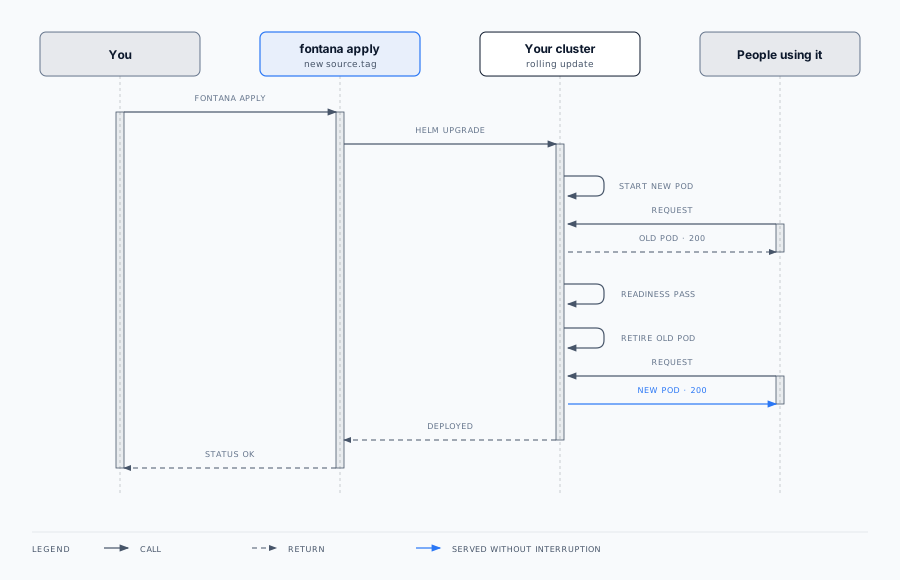
To upgrade, change source.tag and run fontana apply again.
- The new release is installed beside the old one and the run re-executes on it. Nothing is overwritten.
- Workloads whose image and configuration are unchanged are left running. Helm does not restart what did not change, so a small release touches few pods.
- Stateless workloads roll with
maxUnavailable: 0: Kubernetes starts a replacement, waits for its readiness probe, shifts traffic, and only then removes the previous pod. Measured across rolling upgrades: zero failed requests. - In staging and production these workloads run two or more replicas with a PodDisruptionBudget, so node maintenance and autoscaling cannot take the last one away.
- If a new pod never becomes ready, the rollout stalls with the old pods still serving.
- There is no maintenance page and no deploy-time stop.
Stateful workloads such as the databases, the graph store, and the secret store hold a read-write-once volume, so a replacement cannot mount it until the current pod releases it. Ordinary application releases do not touch them. When their own images change, they restart briefly and clients reconnect.
Rolling back
Section titled “Rolling back”Point source.tag at the previous release and run fontana apply. That release is still installed under releases/, and because releases are immutable and content-addressed it is exactly the artifact that ran before. Schema changes are written to accept both the old and the new shape across one release, so a roll-forward and a roll-back both land on a schema the running code understands. See Backup and restore for data recovery, which is a separate concern from release rollback.
Command reference
Section titled “Command reference”| Command | Description |
|---|---|
fontana apply |
Reconcile every cluster, namespace, and workspace in fontana.yaml. |
fontana status |
Health checks for installed workloads, HTTPS endpoints, and declared remote origins. Exits non-zero on failure. |
fontana resources <workspace> |
HTTPS URLs for Flow, the APIs, health dashboards, and Grafana, plus operator console logins. |
fontana secrets <workspace> |
The credential block for wiring a local development environment against this workspace. |
fontana restore <workspace> [--run <timestamp>] --yes |
Rebuild a workspace’s data from a nightly backup run: services paused, artifacts checksum-verified, databases, secrets, graph and file store replaced, services resumed and health-checked. See Backup and restore. |
fontana soc2 snapshot |
Write a SOC 2 evidence pack for every declared cluster: RBAC, network policies, Helm releases and values, running images, and namespace security labels. |
Use fontana resources for browser URLs and console sign-in. Use fontana secrets when wiring a development environment.
Environment variables
Section titled “Environment variables”| Variable | Purpose |
|---|---|
FONTANA_CONFIG |
Path to fontana.yaml (alternative to --config). |
FONTANA_HOME |
Root for installed releases, the toolchain, and CLI-owned state. |
FONTANA_GHCR_PAT / FONTANA_GHCR_USER |
Registry pull credentials at install and apply time. |
| The platform bearer token | Required when any platform service is consumed by URL or installed. Same shell as fontana apply. |
FONTANA_REMOTE_S3_ACCESS_KEY / FONTANA_REMOTE_S3_SECRET_KEY |
Backup bucket credentials, required with remoteStore. |
FONTANA_LOG_FORMAT=json |
Structured JSON logs, for shipping deploy output into your log platform. |
Logging
Section titled “Logging”Install and deploy logs use one format, with the cluster or namespace in brackets:
2026-09-18T06:11:48Z INFO [tenant-demo] apply: tenant 'demo' on cluster 'main' (namespace tenant-demo)2026-09-18T06:12:38Z INFO [tenant-demo] deploy: helm upgrade complete, status=deployedComponents include apply, config, source, deploy, and status.
Related documentation
Section titled “Related documentation”- Deployment overview: the two layers and release pinning
- Architecture: namespaces and workspace isolation
- Hardware requirements: cluster RAM, CPU, and disk
- Self-hosted deployment: the Ubuntu and macOS install paths, private registry mirrors
- Cloud deployment: managed cloud and customer VPC
- Backup and restore: nightly online backups and configuration export
- Observability: Grafana and health probes after apply